


ICE2U
3.775.00 Reviews
App Specs
- Version
- 1.25.21
- Updated On
- License
- Free
- Downloads
- 50,000+
- Developer
- IceHouseAmerica
- Categories
- Food & Drink
- Platform
- Android
Screenshots
 Analysis by AppCompare
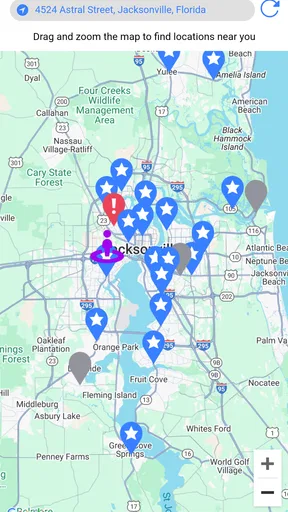
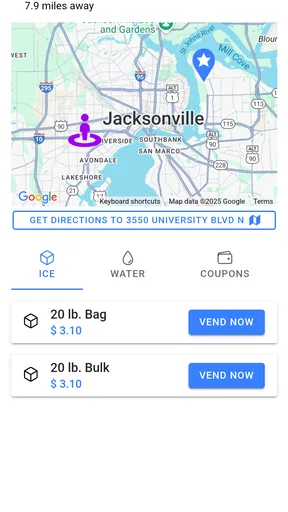
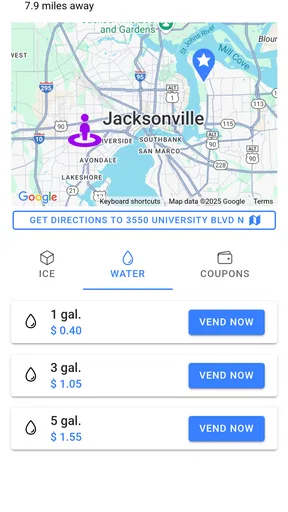
I tried ICE2U as the kind of app you open when buying ice or water is part of a practical errand rather than a carefully planned shopping trip. Its purpose is straightforward: it helps people find and use Twice the Ice vending services, while also giving the purchase a rewards angle. That makes it more interesting than a simple location finder, but only if the machines covered by the service are useful in your area.
What stood out to me is how naturally this app fits shared household routines. One person can notice that the cooler is empty, another can stop at a vending location on the way home, and the purchase can still contribute to the same general rewards habit if the account arrangement is handled sensibly. I would not describe it as an essential food-and-drink app for everyone, but for households that regularly buy bagged ice or refillable water, it can turn a repetitive stop into something easier to organize.
How ICE2U fits into a shared household routine
The best everyday scenario is simple. Imagine preparing for a weekend gathering, a long drive, or a day at a sports field. You need ice, but you do not want to walk through a supermarket looking for a bag that may have been sitting in a freezer for hours. With ICE2U, I would check the available vending option before leaving, decide who is making the stop, and use the app as the shared reference point rather than sending a vague message such as “pick up ice somewhere.”
That small change matters in a family or shared home. A vending location can become part of a regular route: the person commuting home checks it, the person planning the event knows where the supply will come from, and nobody has to guess whether the usual store has enough stock. The app is most useful when it supports that coordination, not when it is treated as entertainment or as a replacement for a full grocery-shopping service.
I also see a practical role for roommates. If one roommate normally buys drinks and another handles outdoor supplies, ICE2U can give both people the same place to check before making a detour. The rewards element may make repeated purchases feel less wasteful, although I would still judge the app primarily by whether the vending locations are convenient. A reward is not much of a benefit if claiming it requires an inconvenient trip.
There is an important distinction between household use and shared-device use. If several people use one phone, the person holding the device may end up being the person who checks the location, completes the purchase-related interaction, and manages the rewards activity. That is convenient for coordination, but it can blur who is actually using the account. I would decide on one household routine before signing in repeatedly on different people’s behalf.
My preferred arrangement would be for one adult to act as the account owner and for other household members to treat the app as a planning tool unless the service clearly supports their own separate account usage. That keeps reward activity easier to follow and avoids the awkward situation where two people assume a purchase belongs to the same account when it does not. ICE2U can help a household coordinate, but it should not be mistaken for a shared family-management system.
Worth Reading Before You Choose

EA SPORTS FC Mobile 26 Is a Bigger Football Game, but It Takes Time

Flipboard Shows What News Apps Must Do Beyond the Feed

Switching to Android Auto Means Rethinking Your Driving Routine

Google Calendar Makes a Crowded Week Easier to Manage

Ludo King Makes the Most of the Minutes Between Plans

Baby Panda World Brings Quick Play to Modern Phones, but Its Game Library Feels Busy
What I would do before the first purchase
I would start by checking whether the app shows a useful vending option near the places my household already visits. This is more important than installing it merely because the rewards concept sounds appealing. If the nearest machine is outside the normal route, the app may add another screen to an errand without saving time.
Next, I would decide who needs the app installed. In a single-person household, that answer is obvious. In a shared home, installing it on every device may create more confusion than convenience if everyone uses different accounts or expects the rewards balance to be shared. A better approach is to choose the person most likely to make the purchase and let that person manage the main app activity.
I would also test the routine on an ordinary day rather than waiting for a party or emergency. Look up the location, note how long the detour feels, and see whether the app makes the decision clearer than your existing method. This is one of the less obvious ways to evaluate ICE2U: the real benefit is not the first successful use, but whether it reduces uncertainty on the second and third purchase.
Because the app is free, the cost of trying it is low. Still, free does not mean frictionless. You may need to pay attention to which person is signed in, where rewards activity is recorded, and whether the app’s location information matches your actual route. I would avoid creating a complicated household process around it until I knew it worked reliably for the specific vending locations I use.
Account boundaries matter more than they first appear
For a shared device, I would be careful about leaving the app open while another person is using the phone. The issue is not just privacy; it is also accuracy. If one person checks a machine and another later uses the same screen, the second person may assume the first person’s choices or account state applies to them. Keeping the app associated with one responsible user makes the reward trail easier to understand.
For children or younger teenagers, I would treat ICE2U as an adult-supervised errand tool. Its Everyone age rating makes it broadly suitable from a content perspective, but that does not automatically mean a child should manage purchases, account details, or rewards independently. The practical questions are who carries payment responsibility, who chooses the vending location, and who confirms that the product is appropriate for the occasion.
This is especially relevant when a child borrows a parent’s phone. I would let a child help locate the machine or check the route, but I would keep the actual purchase decision with the adult. That arrangement uses the app without turning a simple ice run into an unplanned account or spending lesson. It also avoids assuming that an age rating is the same thing as permission to use every part of an app without supervision.
For adult roommates, the boundary is different but still useful. I would not assume that one person’s rewards activity can automatically be transferred to another person. If the household wants to collect benefits together, the adults should agree on the account owner and on how purchases are recorded. If they prefer complete independence, each person should use their own account and accept that the app is serving separate routines.
That may sound overly careful for an ice-and-water app, but small account misunderstandings are exactly the kind that become annoying later. A clear rule at the beginning is easier than trying to reconstruct who used the app after several errands. ICE2U works best when the household treats it as a focused utility rather than a communal account that everyone can use casually.
Using the app for coordination instead of last-minute guessing
One of my favorite possible uses is planning around events. Before a picnic, gathering, or outdoor activity, I would check the vending option early and send the location information to the person responsible for supplies. That creates a specific handoff: one person plans, another collects, and the group knows what the errand involves. It is more dependable than assuming the nearest shop will have enough ice when everyone is already on the way.
The same approach works for recurring needs. A household that regularly fills coolers can decide on a reminder day, check ICE2U before leaving, and combine the stop with an existing commute. The important tip is to connect the app to a route you already travel. If you open it only after discovering that you need ice immediately, you may be forced into a poor choice based on distance rather than convenience.
I would also use a simple message alongside the app: tell the other person which location you checked and what the plan is. The app can provide the service-related information, but it cannot replace household communication. This is a genuine trade-off. ICE2U may make the supply source easier to identify, yet people still need to agree on timing, quantity, and who is paying.
For shared vehicles, coordination becomes even more useful. If two people use the same car, the person leaving first can check the app and mention the stop before handing over the keys. That avoids duplicated trips. On the other hand, if the app shows a location that is technically nearby but inconvenient to access from the current direction of travel, a supermarket or local store may still be the better choice.
I would not rely on ICE2U as the only plan for a large event. A vending app can help locate a source, but event preparation also depends on storage space, transport, and timing. The app is strongest at the “where can I get this?” part of the problem. It is not a complete supply-management tool, and treating it as one would create expectations it was not designed to meet.
Rewards are useful only when they fit the routine
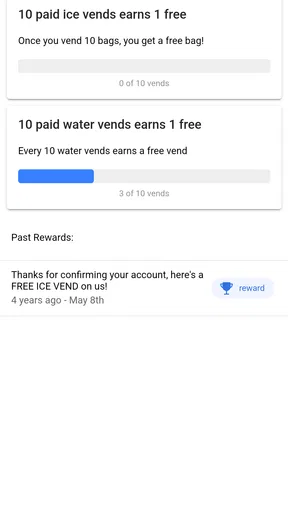
The rewards feature gives repeated purchases a reason to stay within the app’s ecosystem. In my view, the smart way to approach it is to regard rewards as a bonus for a purchase you already needed, not as a reason to travel farther or buy more. That mindset keeps the household from confusing a small benefit with genuine savings.
For a family, the main decision is whether rewards should follow the person who buys the ice or the household that needs it. If one adult makes nearly every purchase, keeping the activity with that account is simple. If several adults alternate, they should agree on a consistent method. Without that agreement, the reward history can become difficult to interpret, particularly when one person uses a shared phone and another uses a personal device.
A useful habit would be to check the rewards area after completing a normal purchase, then stop thinking about it until the next planned errand. I would not repeatedly open the app during a busy day hoping to optimize a minor benefit. The time spent coordinating accounts can outweigh the value of the reward if the household does not buy ice or water regularly.
This is also where ICE2U differs from ordinary grocery shopping. A store gives you broader choice and lets you combine ice or water with many other items. The app’s appeal is more focused: it can make a dedicated vending stop easier to find and potentially more rewarding. If your priority is one-stop shopping, a supermarket remains more practical. If your priority is a quick, specialized purchase along a familiar route, ICE2U has a clearer advantage.
Age context, trust, and sensible supervision
ICE2U is marked for Everyone, which suits its straightforward food-and-drink purpose. I did not approach it as a social network or a game, and I would explain it to younger users as a tool for locating and handling an errand. That framing helps children understand that the app supports a real-world purchase rather than offering a free-form activity with no consequences.
Trust still matters in a shared household. An adult should know which account is active, who is making the purchase, and whether a child is simply checking a location or actually handling the transaction. The app’s general-audience rating does not remove the need for those household rules. In practice, the safest arrangement is often the simplest: an adult keeps control of the account, while younger family members can participate in planning under supervision.
For older relatives, the app may be useful if they already buy ice or water from the covered vending service, but the value depends on clarity and routine. I would help them set up the app once, identify the relevant location, and write down the household plan in ordinary language. If they find the app less convenient than their familiar store, there is no reason to force a change merely because rewards are available.
The same principle applies to anyone uncomfortable with account-based services. ICE2U may be a good fit for people who like having a dedicated way to locate a vending option. It may be a poor fit for someone who prefers cash purchases, does not want another app on their phone, or rarely needs ice and water outside a supermarket trip. Convenience is personal here; the app does not automatically improve every version of the errand.
Performance, platform expectations, and the current release
ICE2U comes from IceHouseAmerica and is available as a free food-and-drink app. It reached the store on February 13, 2025, and the current release is version 1.25.21. On Android, it requires operating system 11 or newer, so anyone using an older phone should check compatibility before planning around it.
The app has passed the early adoption stage without becoming a universally familiar household name. It has more than fifty thousand installs, with an average rating of 3.7 from roughly two hundred ratings and about seventy-five written reviews. I read that overall signal as mixed but viable: enough people have tried it to make the concept credible, while the rating suggests users should judge the local experience rather than assume it will be perfect everywhere.
Those figures are useful context, but they do not answer the question that matters most: is the nearest participating vending option convenient for you? A person living near a regular route may find the app genuinely helpful, while someone far from a suitable machine may gain little from installing it. Local usefulness outweighs the broad store impression.
I would also keep the phone requirement in mind when recommending it to a mixed-device household. The stated minimum operating system is relevant to Android users with older hardware, and shared households often keep an older spare phone around. If that device cannot run the app, designate a newer phone for planning rather than assuming every family member can access the same experience.
Where it beats a supermarket, and where it does not
Compared with a supermarket, ICE2U offers a narrower but more focused workflow. A supermarket is better when you need several groceries, want to compare brands, or prefer a familiar checkout. It may also be the safer fallback when you are already inside the store. ICE2U becomes more attractive when the goal is specifically ice or water and a vending location sits along the route.
Compared with a general map app, ICE2U has a more relevant purpose. A map can show nearby businesses, but it may not organize the search around this particular vending service or connect the errand with rewards. The trade-off is breadth: a map gives you many alternatives, while ICE2U is useful only within its own service context.
Compared with simply asking a family member where to buy ice, the app can reduce uncertainty before someone leaves home. That is its strongest household benefit. Still, it does not eliminate the need to check practical details such as route convenience and whether the intended purchase fits the occasion. I would use it to make the plan more specific, not to outsource the entire decision.
There are also situations where I would skip it. If I buy ice only once or twice a year, the rewards angle is unlikely to matter. If the usual store is closer, cheaper for my overall basket, or easier for my family to access, the app adds little. And if several household members cannot agree on one account routine, the coordination benefit may disappear.
My household verdict after weighing the trade-offs
I see ICE2U as a specialized utility with a surprisingly useful shared-household angle. It can help a family, couple, or group of roommates coordinate a dedicated ice or water stop, especially when one person plans and another person travels. The rewards feature gives regular users an extra reason to keep the app available, but it should remain secondary to location convenience.
My strongest advice is to establish account boundaries before inviting everyone to use it. Choose the responsible adult or regular purchaser, decide whether the household wants one shared routine or separate accounts, and use the app alongside a clear message about who is making the stop. That small amount of organization prevents most of the confusion a shared device can create.
I would recommend ICE2U to people who frequently buy ice or water from vending locations connected with IceHouseAmerica and want a focused way to coordinate those trips. I would be less enthusiastic for occasional buyers, people who rely on supermarket shopping, or households whose nearest useful location is not part of their normal route.
In the end, this is not an app I would install just to fill space on my phone. I would install it when the service matches a real household habit. In that situation, the combination of location planning and rewards can make a small but recurring errand more organized. For everyone else, the ordinary alternatives may remain simpler. My final view is positive but practical: the app earns its place when it shortens a real trip, not when the rewards idea alone sounds appealing.
Because it is free and intended for Everyone, trying it is relatively easy for eligible Android users, provided the device runs Android 11 or later. I would test it with one normal purchase, keep the account arrangement clear, and then decide whether it genuinely improves the household routine. That is the fairest way to judge ICE2U: by the quality of the errand it helps you complete, not by the promise of the feature list.
Pros
- Simple interface makes core features easy to find.
- Useful for users who need quick access to ICE details.
- Lightweight design should work well on older devices.
- Information can be kept available when every second matters.
- Practical tool for emergency-preparedness planning.
Cons
- Its usefulness depends on keeping contact details updated.
- Some features may require permissions to work correctly.
- The app may feel limited outside emergency-related situations.
- Privacy concerns may arise when storing personal information.
- Emergency services should not be contacted through the app alone.
FAQs for ICE2U
What is ICE2U and what can I use it for?
ICE2U is designed to help users access and manage its available services through a mobile device. After installing it, you can explore the main sections, review the information provided, and use the app’s tools according to your needs. The exact experience may depend on your location, account status, and the version available for your Android or iOS device.
Is ICE2U free to download and use?
The ICE2U app may be available to download without an upfront installation charge, but some features or services could involve payments, subscriptions, account fees, or third-party costs. Before confirming a transaction, carefully check the pricing information shown inside the app. Availability and charges can also vary by country, platform, promotions, and the service connected to your account.
Which devices are compatible with ICE2U?
ICE2U is intended for mobile devices running a supported version of Android or iOS. Compatibility can depend on your phone or tablet model, operating-system version, available storage, and regional app-store requirements. If the application does not appear in your store, cannot be installed, or performs poorly, check for system updates and review the developer’s current compatibility information.
Does ICE2U require an account or personal information?
Some functions in ICE2U may be available immediately, while other features can require registration, login credentials, or additional personal information. The requested details may be used to identify your account, personalize the service, process requests, or provide support. Before signing up, review the app’s privacy policy and only provide information that is necessary for the features you intend to use.
What should I do if ICE2U is not working correctly?
If ICE2U crashes, fails to load, or does not perform as expected, first confirm that your internet connection is stable and that the app is updated. Closing and reopening it, restarting your device, or reinstalling the application may resolve temporary problems. If the issue continues, check the official support channel and include your device model, operating-system version, and a clear description of the error.


